In Codex
Use ChatCut's Product in Times Square Skill with my attached bottle photo. Make a 10-second, 16:9 billboard mockup video with the exact brand text 'Cedar Soda'. Show the credit estimate before generating.
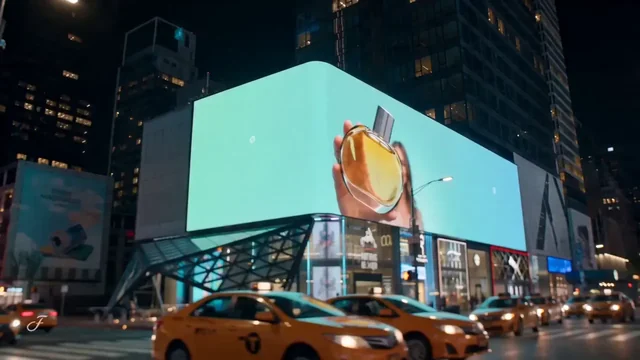
Make a Times Square billboard video from your product photo, with a glowing screen and city traffic below.
Product in Times SquarePro
What happens next
Video generation needs a paid plan and uses credits. Check the estimate in ChatCut before the run. Product ad guide



Trusted by 400,000+ creators
Create a short generated billboard video for a launch concept or brand story.
Show your product on a glowing city billboard, with surrounding buildings and passing taxis below.
Provide a clear product image and exact brand wording to adapt the billboard scene to your brand.
Create a 10- or 15-second video at 720p in 16:9, with a fixed camera overlooking the street.
Bring the clip into your ChatCut project, trim it, add captions or music, and export the finished video.
Prepare your product and brand text here, then generate the city scene in ChatCut.
Add a clear JPG, PNG or WebP product photo up to 5 MB. This page does not upload files or charge credits.
Write the brand wording you want and choose 10 or 15 seconds. The output stays in 16:9 landscape.
Continue to the ChatCut editor, sign in and review the credit estimate before generating. Check the result, then edit or export.
Use a generated billboard concept when your campaign calls for a product reveal in a recognizable city setting.
Add a Times Square scene to a launch video using the product photo and brand wording you already have.
Show a moving billboard idea in a client presentation, clearly labeled as a generated concept.
Use the city clip as a reveal between product shots, then add your own captions in the editor.
Follow the Codex or Claude Code setup guide, then provide your photo and exact brand text.
In Codex
Use ChatCut's Product in Times Square Skill with my attached bottle photo. Make a 10-second, 16:9 billboard mockup video with the exact brand text 'Cedar Soda'. Show the credit estimate before generating.
In Claude Code
Make a 15-second, 16:9 Times Square billboard concept in ChatCut using my attached product photo and the exact brand text 'Luma Skin'. Keep the template's city scene and show the estimate before running.
Also on Grok and Antigravity. See all plugins.
Your result lands in a ChatCut project. Trim it, add captions, a voiceover or music, then export. Manual editing and export do not use credits.
100+ Skills. No experience needed. Start in one click.
Unlock member features, models, and export allowances. Get more credits every month
Billed annually · $252
16% offBilled annually · $456
24% offBilled annually · $864
28% offBilled annually · $1692
30% off$0No credit card required
Some features are completely free in Codex, Claude, and WorkBuddy. Learn More
| Credits per month | Monthly | Annual |
|---|---|---|
| Starter · 100 credits / month | $25/month Billed monthly | $21/month $252 · Billed annually |
| Plus · 200 credits / month | $48/month Billed monthly | $38/month $456 · Billed annually |
| Pro · 400 credits / month | $92/month Billed monthly | $72/month $864 · Billed annually |
| Max · 800 credits / month | $180/month Billed monthly | $141/month $1692 · Billed annually |
| Max · 1,200 credits / month | $270/month Billed monthly | $211/month $2532 · Billed annually |
| Max · 2,000 credits / month | $450/month Billed monthly | $351/month $4212 · Billed annually |
It generates a short video of your product on a Times Square billboard using the Product in Times Square Skill. The result is a moving city ad concept, rather than a downloadable static mockup template.
Select a product photo, enter exact brand text and choose the duration in the form above. Continue to the ChatCut editor to sign in, check the estimate and run the generation. This page does not upload your files or deduct credits.
Provide one clear product photo in JPG, PNG or WebP format, up to 5 MB. Put the front of the product and its packaging in view, and enter brand text of up to 150 characters. This Skill does not ask you to upload a presenter photo.
The Skill generates a 10- or 15-second video in 16:9 landscape at 720p. Its city scene uses a fixed camera and traffic below the billboard. The template does not offer a vertical generation option.
No. Video generation needs a paid ChatCut plan and uses credits, with an estimate before the run. Every new take is a separate paid job. Manual editing, adding captions and exporting do not use credits.
No. This creates an AI-generated video depicting your product on a Times Square billboard. It does not book advertising space or put your ad on a real screen.
No. This Skill delivers a generated video, not a Photoshop file or smart-object mockup. Review the product shape, logo and brand lettering in the clip before using it.
Yes. Bring the clip into a ChatCut project to trim it, add captions or music, and export it. If you want a different generated take, that is a new paid generation job.
Use the Codex setup guide, or connect ChatCut through Claude Code's setup guide. The plugin does not install into the ChatGPT or Claude websites. Provide the photo and brand text with a prompt above; hosted generation uses your ChatCut account and credits.
Guides: Product ads and UGC guide · All Skills
AI apps
Convert & compress
Edit video
Audio & voice