Can Claude make videos? Not in a plain chat on claude.ai, where asking for a video only gets you a script or code, and Anthropic’s built-in Claude Motion beta is restricted to Team and Enterprise plans. Once you connect Claude Code to a video generator and timeline editor, though, Claude can produce commercial-grade videos you would actually ship.
This test was run by Claude Opus 5.5 in Claude Code, using the ChatCut desktop connection. On November 15, 2026, we gave Claude two real commercial briefs instead of throwaway test clips: a 20-second kinetic-type SaaS launch promo (0.22 credits) and a 15-second sparkling beverage TV commercial (16.67 credits). Below are both finished MP4s, how Claude planned, generated, and edited them, the 16.89-credit bill, and the exact places where a human editor still steps in.
Key takeaways
- Plain Claude chat doesn’t output MP4 files. Standard chats write scripts and shot lists, while Anthropic’s Claude Motion beta animates code on Team and Enterprise plans only and never generates camera footage.
- UI-heavy app promos work best as code, not AI video. Claude built our 20-second SaaS launch video as an editable motion graphic from real homepage screenshots and brand colors for 0 visual credits (0.22 credits for generated music).
- Product commercials stay sharp when anchored to a packshot. Generating a clean studio can photo first kept every letter on the label legible across a five-shot, 15-second Seedance 2.5 TV spot for 16.67 credits total.
- Claude catches layout and audio bugs, but humans still finish the polish. Inspecting timeline frames fixed clipped headlines and silent transitions automatically, leaving brand-voice tweaks, full music beds, and 1080p mastering to you.
Can Claude make videos on its own?
No. On claude.ai, the mobile apps, and standard desktop chat, Claude has no built-in video model, so asking for a video returns planning copy: hooks, shot lists, or prompts to paste elsewhere. Getting an actual MP4 from a Claude video generation setup in November 2026 depends on which route you pick:
- Claude Motion (Team and Enterprise beta). According to Anthropic’s Claude Motion help guide (published October 8, 2026), Claude Motion builds code-driven animations of text, charts, shapes, and attached images in the Artifacts panel (from chat, Output > Motion, or a Motion template) and exports MP4s where changing one number or scene speed leaves the rest intact. It is available only on Team (on by default) and Enterprise (off by default until an Owner or Primary Owner enables it under Organization settings > Artifacts), not Free, Pro, or Max; it counts toward plan message limits and doesn’t generate realistic footage or people.
- Claude Code with local frameworks. On individual Pro, Max, Ultra, Team, Enterprise, or API plans, Claude Code can write and render coded graphics locally for $0 using React-based Remotion (
npx create-video@latest) or HTML/CSS/GSAP-based HyperFrames (see our Claude motion graphics guide), though code alone still can’t create photographed products or people. - Claude Code with ChatCut. Installing the ChatCut Claude Code plugin on macOS 13+ or Windows 10+ connects local Claude Code (in a terminal, or in the Claude desktop app’s Code tab set to Local) to ChatCut’s multi-track timeline, coded motion graphics, and AI video models: Seedance 2.5, Seedance 2.0 (including Fast and mini), Kling 4.0 and 4.0 Flash, Kling 3.0, Gemini Omni 1.1 Flash, and MiniMax H3 and H3 Max. ChatCut doesn’t run inside claude.ai, mobile apps, or the desktop Chat and Cowork tabs (browser projects use the Web plugin); paste
Read ChatCut.io/desktop to install ChatCutin Claude Code to set it up (step-by-step screenshots in how to edit video with Claude). Video generation requires a paid ChatCut plan and bills per clip in credits.
Can Claude make a SaaS launch promo video? (0.22 credits)
For our first production test, we asked Claude Opus 5.5 for the kind of fast-paced software launch video SaaS teams commission for Product Hunt or social feeds:
How Claude planned it and chose code over a video model
Sending software screenshots into a video diffusion model blurs small interface text and invents fake buttons. Instead of calling a video generator, Claude followed the structure of ChatCut’s SaaS Kinetic Type Launch workflow and wrote the entire 20-second spot as a Remotion motion graphic on the ChatCut timeline, keeping every headline and UI card pixel-sharp at zero visual credit cost.
Before writing a line of animation code, Claude gathered real brand assets from chatcut.io rather than making up marketing copy:
- Real interfaces and logo. Claude scraped the live homepage, captured nine high-DPI viewport screenshots, cropped the actual Desktop editor, Skills library, and creative-tool cards, and pulled the official white SVG wordmark.
- Measured brand palette and fonts. Following the preset’s color-extraction rules, Claude sampled #111111 charcoal from the homepage Download button for the background, #FBFBFB off-white for body headlines, and #DC733B orange from the editor’s Export button as the single accent color (dropping the template’s default lime green and purple), paired with the site’s actual Stack Sans Notch and Inter typefaces.
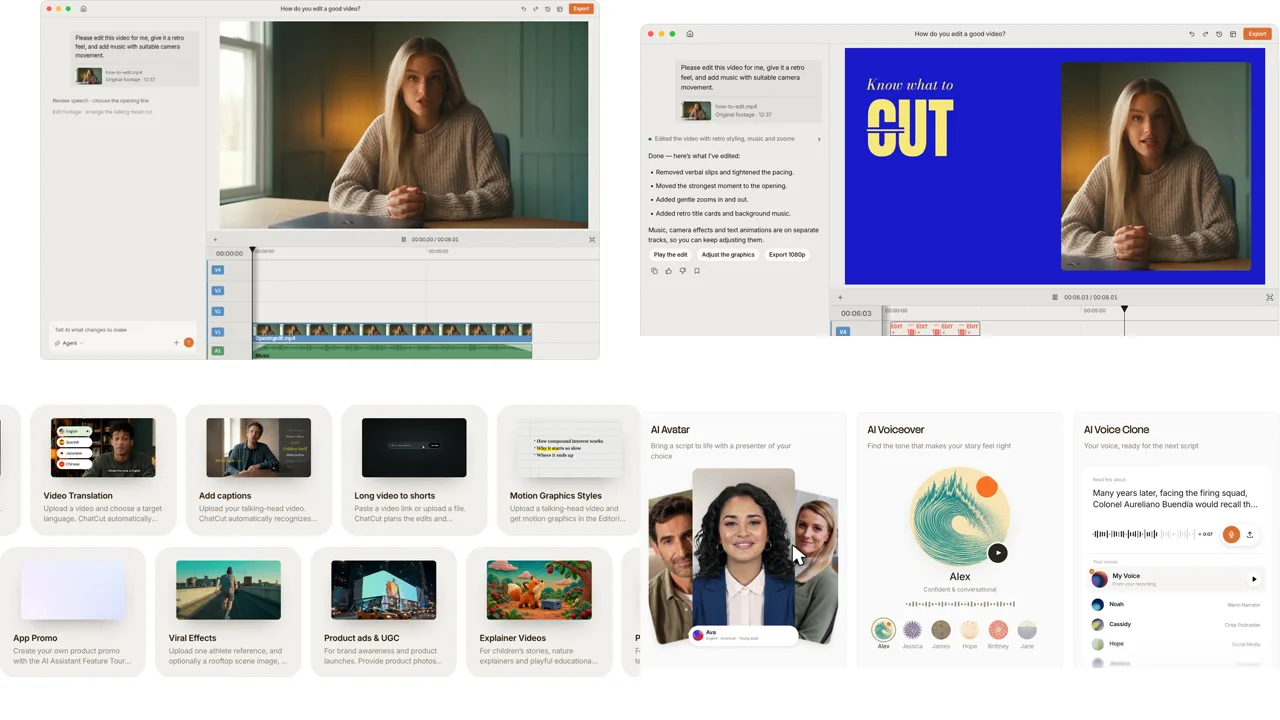
In a normal interactive session, ChatCut’s app-promo workflow pauses three times so you can sign off on the extracted product facts, creative angle, and storyboard. For this test, we let Claude execute end to end in roughly seven minutes of build time after asset capture.
The 8-beat timeline and 0.22-credit music track
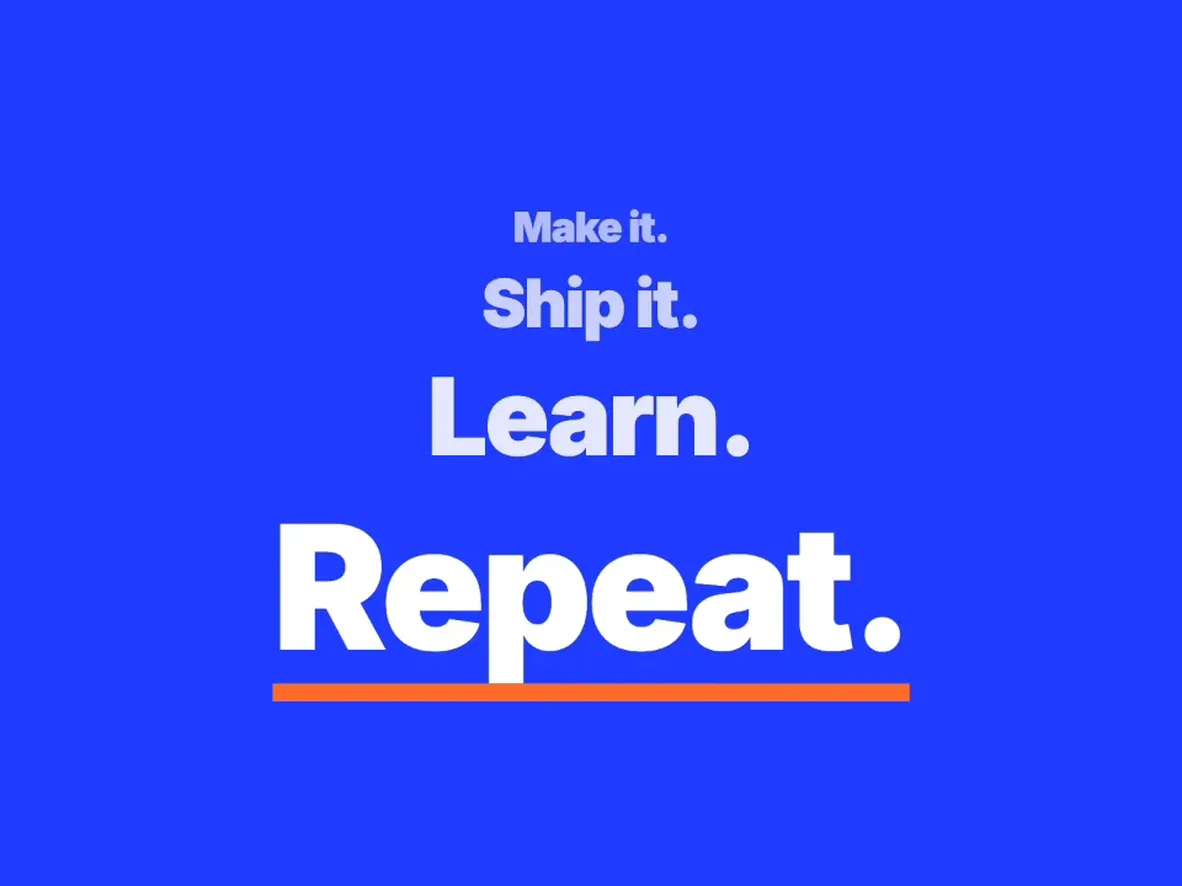
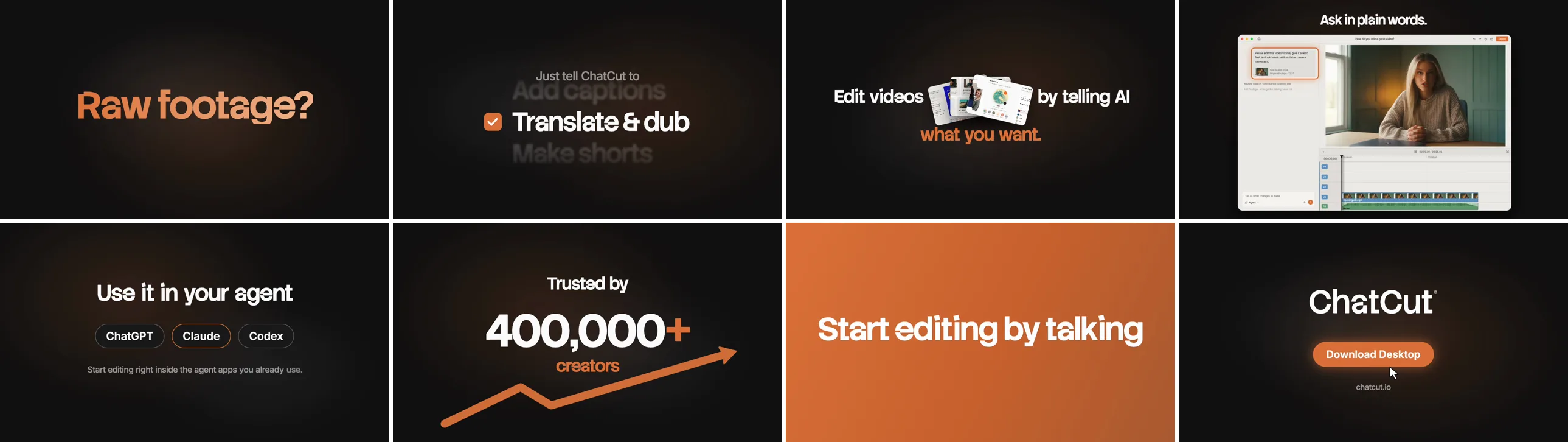
Compressing the 34-second reference template into a tighter 20-second cut (600 frames at 30 fps), Claude sequenced eight overlapping beats driven by exponential easing, oversize blur-ins, and 8-frame transitions:
| Beat | Timing | Visual action | On-screen copy |
|---|---|---|---|
| 1 | 0.0–2.4 s | Oversized blurred orange text slams in, followed by staggered word slide-in | Raw footage? / Skip the busywork. |
| 2 | 2.2–5.6 s | Vertical word wheel spins and stops as the checkbox ticks orange on each feature | Just tell ChatCut to: Clean up speech / Add captions / Translate & dub / Make shorts |
| 3 | 5.4–8.7 s | Three real UI cards fan open in the middle of the homepage headline | Edit videos [UI cards] by telling AI / what you want. |
| 4 | 8.5–11.7 s | Full Desktop editor screenshot rises from blur and pushes in; prompt box glows orange | Ask in plain words. / Get a real, editable timeline. |
| 5 | 11.5–14.2 s | Headline pops in above three pill badges (Claude highlighted in orange) | Use it in your agent / ChatGPT · Claude · Codex |
| 6 | 14.0–16.7 s | Counter climbs linearly from 0 to 400,000+ while an orange trend arrow draws below | Trusted by / 400,000+ / creators |
| 7 | 16.5–18.2 s | Full-bleed orange frame slams in, then whips left with horizontal motion blur | Start editing by talking |
| 8 | 18.0–20.0 s | Official SVG wordmark appears; cursor moves in, clicks the button, and turns it orange | Download Desktop / chatcut.io |
To score the cut, Claude generated a 20-second, 120 BPM instrumental electronic track for 0.22 credits, placed it on audio track A1 with a 0.2-second fade-in and 1.2-second fade-out (-15.8 LUFS integrated loudness), and exported the 720p MP4 for 0 additional credits.
What Claude fixed on its own, and where a human still steps in
Claude didn’t export the first render blind. It sampled 20 frames across the timeline, caught three layout collisions, and patched the linked component before exporting:
- Left-edge text clipping. Several word-by-word lines lacked a horizontal center coordinate and defaulted to the left frame edge, slicing phrases down to “busywork.”, “our agent”, “ed by”, and “tors”.
- Cards overlapping the headline. On beat 3, the three fanned screenshot cards crowded “Edit videos” and “by telling AI”; dropping the font from 66px to 58px and widening the side offsets cleared the cards cleanly.
- Arrow cutting through digits. On beat 6, the rising orange growth arrow drew right across “400,000+”; shifting its path underneath the counter made both readable.
What a human would still adjust: Claude exposed 31 editable properties in ChatCut’s inspector (every text line, four screenshot slots, the counter target, and the three colors), so you don’t need to touch React code to revise the cut. Before publishing, a marketing team would likely rewrite beat 1’s “Raw footage? Skip the busywork.” (the only line Claude wrote itself rather than quoting from chatcut.io) and export the final timeline at 1080p.
Can Claude generate videos for a product TV commercial? (16.67 credits)
Coded graphics can’t shoot high-speed liquid splashes or citrus halves flying past wet aluminum. For our second test, we asked Claude for a broadcast-style beverage commercial modeled on ChatCut’s Sparkling Can Showcase workflow:
Step 1: Generating a clean product packshot first (0.40 credits)
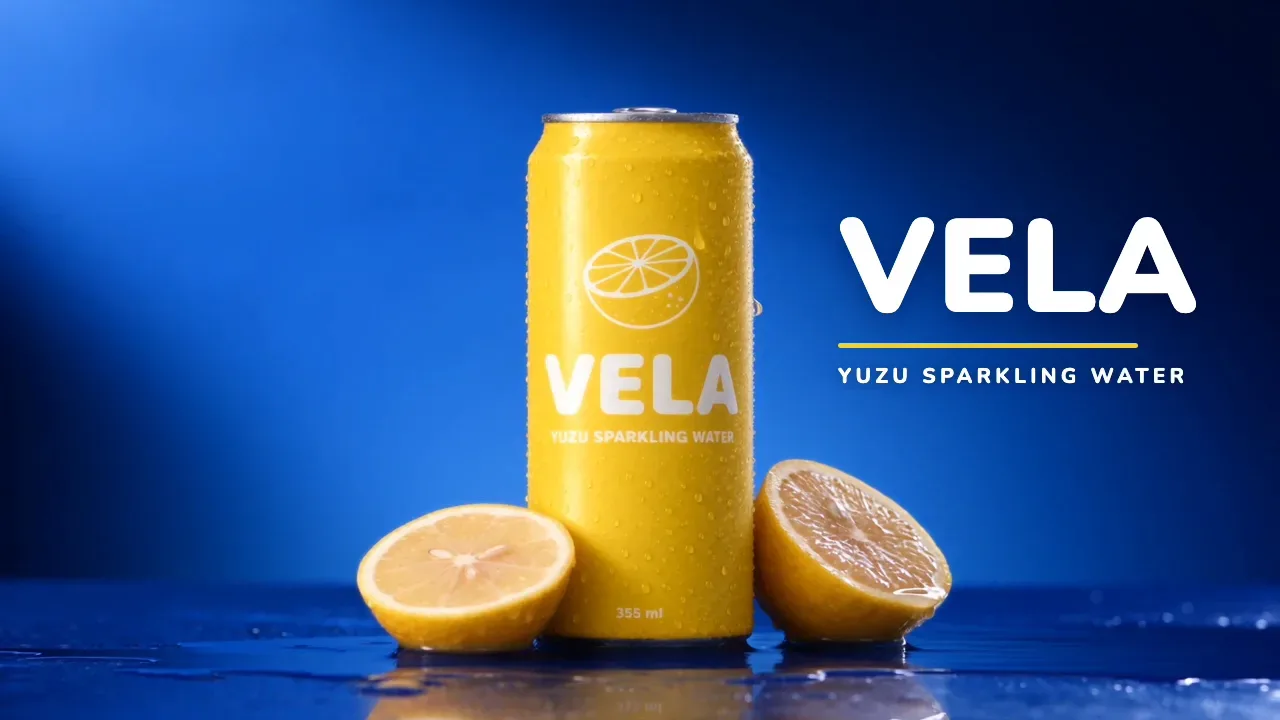
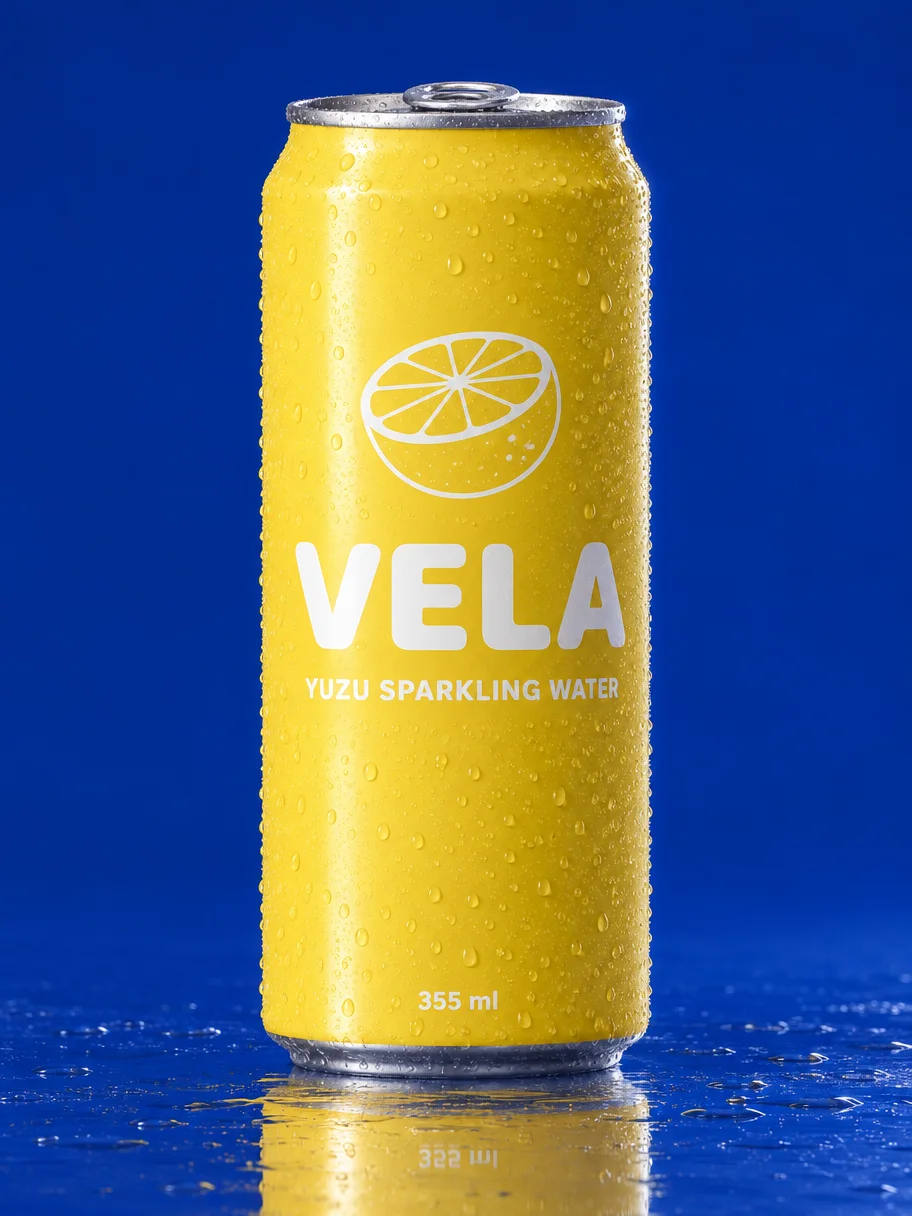
Because no product photo was attached (and we avoided borrowing a real drink brand), Claude created a fictional beverage, VELA Yuzu Sparkling Water, and generated two studio packshot candidates with GPT Image 2.6 Flare at 0.20 credits apiece (0.40 credits total). If you already have commercial photography of your own bottle, can, or hardware, attach your real photo and skip straight to Step 2.
Step 2: Pricing models and rendering five shots in Seedance 2.5 (16.27 credits)
Before submitting the commercial, Claude pulled live 15-second credit quotes across three options in ChatCut:
| Model and resolution | 15-second quote | Why Claude picked or skipped it |
|---|---|---|
| Seedance 2.5, 720p (with reference image) | 16.27 credits | Chosen: runs five timed shots in one clip with native sound while locking the can’s lettering to the packshot |
| Seedance 2.5, 480p draft | 7.24 credits | Skipped here: upgrading a 15-second draft to 1080p costs roughly 40 credits, and rendering a separate 720p clip re-rolls the splashes |
| Kling 4.0, 720p | 11.31 credits | Lower price, but the Sparkling Can multi-shot template is tuned around Seedance 2.5’s reference-label locking |
Adapting the Sparkling Can template into high-contrast cobalt blue and yuzu yellow (for more on draft-to-final pricing, see our Seedance 2.5 price breakdown), Claude submitted one 15-second 16:9 Seedance 2.5 generation with five timed camera beats and explicit rules against water curtains or warped text:
The 15-second 720p clip rendered in roughly two and a half minutes and billed 16.27 credits. Claude extracted 25 frames from 0 to 15 seconds to verify every beat:
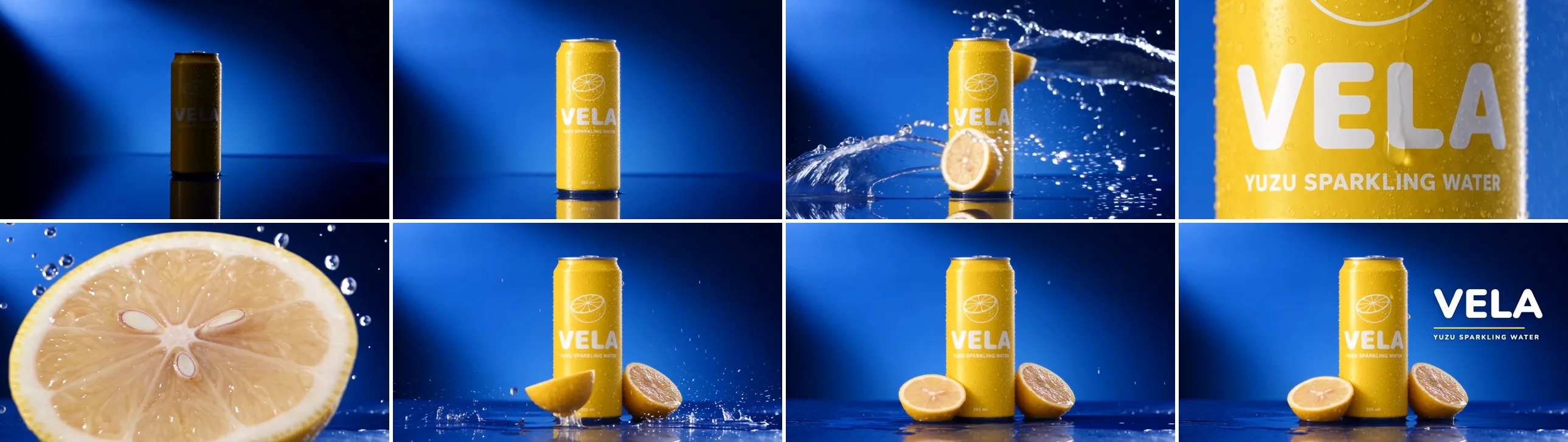
- What held: Twin water bursts swept past the planted can without forming artificial rings; the macro glide kept VELA and YUZU SPARKLING WATER crisp while a condensation drop slid down the aluminum; a translucent yuzu half with three visible seeds wiped across the foreground lens; and the left yuzu half hit the wet table, rocked onto its yellow peel, and settled cut-side-up beside the base.
- Where the model improvised: Instead of starting bright and pushing in from far away at 0 to 2 seconds, Seedance opened on a silhouetted can in a dark blue spotlight beam, snapped the studio key light on at 0.6 seconds, and ran a shorter push-in. Claude kept the shot rather than spending another 16.27 credits because the lights-on reveal worked naturally as an ad opener.
Step 3: Coding the end card, patching audio, and what needs a human (0 credits)
A raw 15-second render still lacked a brand lockup on the final hold. On a new 1280×720 timeline, Claude coded a transparent 3.6-second Remotion end card (“VELA” in bold rounded Nunito 900 to match the can’s lettering, a yellow rule, and “YUZU SPARKLING WATER”) and positioned it in the open cobalt space to the right of the can from 11.45 to 15.0 seconds.
Checking frames and timeline loudness (-24 LUFS integrated) caught two finishing issues Claude fixed before exporting:
- Wrapped subline. On the first timeline preview, “YUZU SPARKLING WATER” broke onto two lines; Claude locked it to a single 21px line.
- Missing audio finish. Seedance’s native track carried rhythm, splashes, and fizz through the first 11 seconds, then faded out and went completely silent past 13.6 seconds without playing the requested finishing accent. Claude searched ChatCut’s built-in sound library and placed a free “Deep Short Whoosh” at 11.03 seconds to punctuate the end-card entrance.
Where a human editor still steps in: First, swap the generated VELA packshot for your real product photography. Second, lay a 15-second music track underneath the spot so the final 1.5 seconds after the end-card whoosh don’t sit in silence. Third, render or promote a 1080p master once you approve the cut.
If you start with footage you already filmed on a camera or phone, such as talking-head videos, interviews, or podcasts, the same Claude Code connection cuts retakes and adds styled captions for zero generation credits; see our Claude video editing test.
What Claude actually called. Across both Round 2 builds, Claude Opus 5.5 drove research, pricing, generation, timeline assembly, and export through ChatCut’s desktop MCP tools: manage_skill, browse_assets, inspect_asset, web_browser, estimate_generation, read_billing, submit_image, submit_music, submit_video, track_progress, push_asset, manage_timelines, edit_item, preview_timeline, browse_library, and export.
Problems we hit in both builds (and how to fix them)
Every snag below came up during our November 15 commercial builds:
| Problem we hit | Why it happened | Fix that worked |
|---|---|---|
| Software UI and small copy turn blurry in AI video models | Video diffusion redraws pixels frame by frame instead of preserving interface screenshots | Build UI-led SaaS promos as coded Remotion motion graphics on the timeline (0 visual credits, sharp text, 31 editable properties) |
| Kinetic text clipped at the left edge and cards overlapped headlines | Word-by-word lines lacked horizontal center coordinates, and fanned cards sat too close to 66px text | Sample frames from every beat on the timeline, center text coordinates explicitly, and step headline size down to 58px |
| Beverage cans risk garbled or mirrored label typography | Text-only video prompts force the video model to invent small packaging letters during motion | Generate or upload a sharp front-facing packshot first, inspect every letter at full zoom, and pass it as a Seedance 2.5 reference image |
| Opening camera move differed from the written prompt | Seedance 2.5 turned a fast distant push-in into a spotlight lights-on reveal plus a shorter push | Check early frames before re-rolling; keep model choices that read like a clean commercial beat rather than burning another 16.27 credits |
| Generated TVC audio dropped to silence in the last 1.5 seconds | Seedance’s native sound wound down after the 11-second splash peak and skipped the closing accent | Add a free sound-library whoosh on the end-card entrance, and lay a 15-second music bed underneath for final delivery |
Which way to make videos with Claude fits your project?
Use this breakdown to pick the right setup before spending message quota or generation credits:
| Route | What you get back | Realistic people & products? | Plan & setup required | Cost beyond your Claude plan | Best for |
|---|---|---|---|---|---|
| Claude Motion | Short coded animations exported as MP4 from Artifacts | No | Claude Team (on by default) or Enterprise (admin opt-in), in beta | $0 extra (uses Claude plan message allowance) | Internal explainers, animated charts, onboarding walkthroughs |
| Claude Code + Remotion or HyperFrames | Source-code video project rendered locally to MP4 | No | Claude Pro, Max, Ultra, Team, Enterprise, or API + Node.js | $0 per local render | Developer video pipelines, standalone code templates |
| Claude Code + ChatCut | Coded motion graphics, AI-generated commercials, audio, editable timeline & MP4 | Yes (Seedance 2.5, Kling 4.0, Omni, MiniMax H3) | Claude Code on macOS 13+ or Windows 10+ + ChatCut Desktop | 0 credits for coded graphics, cuts & local export; paid plan + credits for AI media (0.22 credits for our 20s SaaS promo; 16.67 credits for our 15s TVC) | SaaS launch promos, product TV commercials, UGC ads, editing real footage |
| Plain Claude chat (claude.ai / mobile) | Scripts, hooks, shot lists, and prompts to paste elsewhere | No video file output | Any Claude plan, including Free | $0 | Planning a shoot or drafting prompts for another tool |